# Configuration (/docs/configuration)


This page covers configuration shared by both installation modes.

## Icons configuration [#icons-configuration]

Trident UI lets you load icon groups through providers.

Install the icons package first:

```bash
npm install --save @clubmed/trident-icons
```

For the full icon catalog and usage examples, see the [`@clubmed/trident-icons` Storybook](https://latest.trident-icons.pro.clubmed/?path=/docs/atoms-icon-svguse--docs).
For AI-assisted icon integration guidance, see the [AI integration note](https://latest.trident-icons.pro.clubmed/?path=/docs/ia-integration--docs).
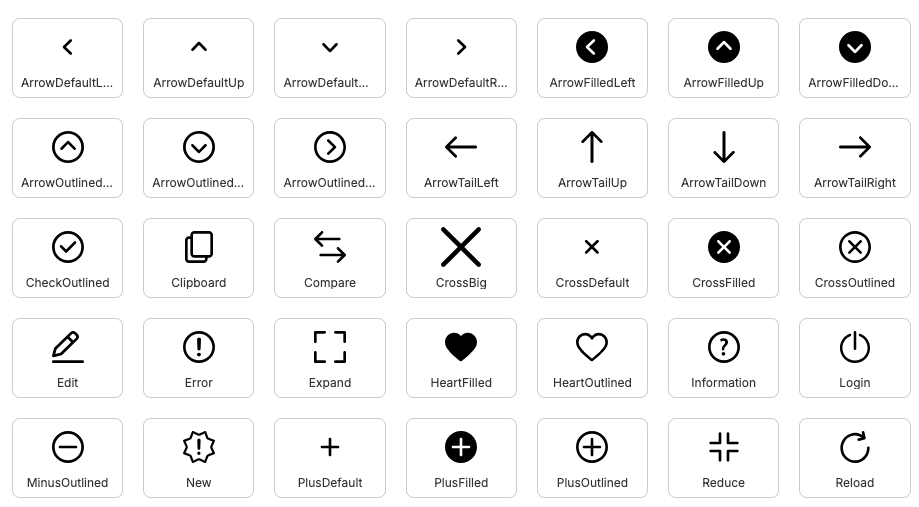
<img src="/images/trident-icons-preview.png" alt="Preview of Trident UI icons" />

*Preview of Trident UI icon sets.*

Available providers:

* `SvgIconProvider`: lazy-loaded SVG rendering.
* `SvgUseIconProvider`: native `svg/use` rendering.

Available icon groups:

<div className="mt-4 grid gap-3 sm:grid-cols-2 lg:grid-cols-3">
  <a className="rounded-lg border border-neutral-200/80 px-3 py-2 text-sm font-medium no-underline transition-colors hover:bg-neutral-100/50 dark:border-neutral-800 dark:hover:bg-neutral-800/50" href="https://latest.trident-icons.pro.clubmed/?path=/story/atoms-icon-svguse--actions" target="_blank" rel="noreferrer">
    Actions
  </a>

  <a className="rounded-lg border border-neutral-200/80 px-3 py-2 text-sm font-medium no-underline transition-colors hover:bg-neutral-100/50 dark:border-neutral-800 dark:hover:bg-neutral-800/50" href="https://latest.trident-icons.pro.clubmed/?path=/story/atoms-icon-svguse--activities" target="_blank" rel="noreferrer">
    Activities
  </a>

  <a className="rounded-lg border border-neutral-200/80 px-3 py-2 text-sm font-medium no-underline transition-colors hover:bg-neutral-100/50 dark:border-neutral-800 dark:hover:bg-neutral-800/50" href="https://latest.trident-icons.pro.clubmed/?path=/story/atoms-icon-svguse--brand" target="_blank" rel="noreferrer">
    Brand
  </a>

  <a className="rounded-lg border border-neutral-200/80 px-3 py-2 text-sm font-medium no-underline transition-colors hover:bg-neutral-100/50 dark:border-neutral-800 dark:hover:bg-neutral-800/50" href="https://latest.trident-icons.pro.clubmed/?path=/story/atoms-icon-svguse--covid" target="_blank" rel="noreferrer">
    Covid
  </a>

  <a className="rounded-lg border border-neutral-200/80 px-3 py-2 text-sm font-medium no-underline transition-colors hover:bg-neutral-100/50 dark:border-neutral-800 dark:hover:bg-neutral-800/50" href="https://latest.trident-icons.pro.clubmed/?path=/story/atoms-icon-svguse--food" target="_blank" rel="noreferrer">
    Food
  </a>

  <a className="rounded-lg border border-neutral-200/80 px-3 py-2 text-sm font-medium no-underline transition-colors hover:bg-neutral-100/50 dark:border-neutral-800 dark:hover:bg-neutral-800/50" href="https://latest.trident-icons.pro.clubmed/?path=/story/atoms-icon-svguse--happy-to-care" target="_blank" rel="noreferrer">
    HappyToCare
  </a>

  <a className="rounded-lg border border-neutral-200/80 px-3 py-2 text-sm font-medium no-underline transition-colors hover:bg-neutral-100/50 dark:border-neutral-800 dark:hover:bg-neutral-800/50" href="https://latest.trident-icons.pro.clubmed/?path=/story/atoms-icon-svguse--iconic" target="_blank" rel="noreferrer">
    Iconic
  </a>

  <a className="rounded-lg border border-neutral-200/80 px-3 py-2 text-sm font-medium no-underline transition-colors hover:bg-neutral-100/50 dark:border-neutral-800 dark:hover:bg-neutral-800/50" href="https://latest.trident-icons.pro.clubmed/?path=/story/atoms-icon-svguse--places" target="_blank" rel="noreferrer">
    Places
  </a>

  <div className="rounded-lg border border-neutral-200/80 px-3 py-2 text-sm font-medium dark:border-neutral-800">
    <div>
      Resort 

      <span className="text-muted-foreground">(SVG only)</span>
    </div>

    <div className="mt-1 text-xs font-normal">
      <a className="no-underline" href="https://latest.trident-icons.pro.clubmed/?path=/story/atoms-icon-svguse--resort-fill" target="_blank" rel="noreferrer">Fill</a> · <a className="no-underline" href="https://latest.trident-icons.pro.clubmed/?path=/story/atoms-icon-svguse--resort-fill-ec" target="_blank" rel="noreferrer">Fill EC</a> · <a className="no-underline" href="https://latest.trident-icons.pro.clubmed/?path=/story/atoms-icon-svguse--resort-outline" target="_blank" rel="noreferrer">Outline</a> · <a className="no-underline" href="https://latest.trident-icons.pro.clubmed/?path=/story/atoms-icon-svguse--resort-outline-ec" target="_blank" rel="noreferrer">Outline EC</a>
    </div>
  </div>

  <a className="rounded-lg border border-neutral-200/80 px-3 py-2 text-sm font-medium no-underline transition-colors hover:bg-neutral-100/50 dark:border-neutral-800 dark:hover:bg-neutral-800/50" href="https://latest.trident-icons.pro.clubmed/?path=/story/atoms-icon-svguse--room" target="_blank" rel="noreferrer">
    Room
  </a>

  <a className="rounded-lg border border-neutral-200/80 px-3 py-2 text-sm font-medium no-underline transition-colors hover:bg-neutral-100/50 dark:border-neutral-800 dark:hover:bg-neutral-800/50" href="https://latest.trident-icons.pro.clubmed/?path=/story/atoms-icon-svguse--services" target="_blank" rel="noreferrer">
    Services
  </a>

  <a className="rounded-lg border border-neutral-200/80 px-3 py-2 text-sm font-medium no-underline transition-colors hover:bg-neutral-100/50 dark:border-neutral-800 dark:hover:bg-neutral-800/50" href="https://latest.trident-icons.pro.clubmed/?path=/story/atoms-icon-svguse--socials" target="_blank" rel="noreferrer">
    Socials
  </a>

  <a className="rounded-lg border border-neutral-200/80 px-3 py-2 text-sm font-medium no-underline transition-colors hover:bg-neutral-100/50 dark:border-neutral-800 dark:hover:bg-neutral-800/50" href="https://latest.trident-icons.pro.clubmed/?path=/story/atoms-icon-svguse--transports" target="_blank" rel="noreferrer">
    Transports
  </a>

  <a className="rounded-lg border border-neutral-200/80 px-3 py-2 text-sm font-medium no-underline transition-colors hover:bg-neutral-100/50 dark:border-neutral-800 dark:hover:bg-neutral-800/50" href="https://latest.trident-icons.pro.clubmed/?path=/story/atoms-icon-svguse--utilities" target="_blank" rel="noreferrer">
    Utilities
  </a>
</div>

By default, no icon provider is set. Import and register only the subsets you need.

SVG mode:

```tsx
import Actions from '@clubmed/trident-icons/svg/Actions'
import { Icon, IconsProvider } from '@clubmed/trident-icons'

function App() {
  return (
    <IconsProvider icons={[Actions]}>
      <Icon name="ArrowDefaultLeft" />
    </IconsProvider>
  )
}
```

You can mix SVG and SVG-use modes:

```tsx
import Actions from '@clubmed/trident-icons/svg/Actions'
import Brand from '@clubmed/trident-icons/svg/Brand'
import { Icon, IconsProvider } from '@clubmed/trident-icons'

function App() {
  return (
    <IconsProvider icons={[Actions, Brand]}>
      <Icon name="ArrowDefaultLeft" />
      <Icon name="ClubMed" />
    </IconsProvider>
  )
}
```

In this setup, `Icon` automatically uses the correct resolver.

### Register custom icons [#register-custom-icons]

You can register external SVG icons without building a custom icon component:

```tsx
import { lazy } from 'react'
import { resolver } from '@/atoms/Icons/svg/SvgIconResolver'
import { Icon, IconsProvider } from '@clubmed/trident-icons'

const CustomIcons = resolver([
  {
    name: 'MyCustomIcon',
    group: 'custom',
    element: lazy(() => import('./MyCustomIcon.svg?react')),
    // viewBox: '0 0 30 30',
    // aspectRatio: 1,
    // orientation: 'left'
  },
])

function App() {
  return (
    <IconsProvider icons={[CustomIcons]}>
      <Icon name="MyCustomIcon" />
    </IconsProvider>
  )
}
```

## Optional: twMerge helper [#optional-twmerge-helper]

If you use `tailwind-merge`, prefer the helper exported by Trident UI:

```ts
import { twMerge } from '@clubmed/trident-ui/helpers/twMerge'
```
